KB
Home > Help >  Northwest Territories access

Main Content

Northwest Territories access

Residents of the Northwest Territories may be able to access their Alberta health records using a MyHealth Alberta Account if they are actively receiving acute or ambulatory care in Alberta.

Who can access:

  • Northwest Territories residents aged 14 and older, with a Northwest Territories identification card or license, who are receiving care at an Alberta hospital or ambulatory care facility.

Who cannot access:

  • Northwest Territories residents who have only received care at community-based services (such as pharmacies or private clinics).
  • Out-of-province residents outside of Alberta and the Northwest Territories.

What you need to sign up:

  • A valid ID card that includes your current address.
  • Completion of document verification (valid for up to 1 year or until your ID expires, whichever comes first).
  • A recent visit to an Alberta hospital or ambulatory care facility.

Important notes:

  • If you do not yet have a MyHealth Alberta Account, you will need to add your current Northwest Territories mailing address to your Alberta.ca account profile under the Contact Information section.
  • Existing processes for people moving between Alberta and the Northwest Territories remain unchanged.
  • Albertans and current MyHealth Alberta Account users are not affected by this change.
  • Parent/guardian access is not available for Northwest Territories residents. People aged 14 and older can sign up for their own account.

Getting started:

Northwest Territories residents can download the MyHealth Alberta app or visit the website. ​

  • Select Create Account and you will be prompted to create an Alberta.ca Account with your email address.
  • Once you have created an Alberta.ca Account, scroll down to the Contact Information section and add your current Northwest Territories mailing address.
  • After you have entered your mailing address, return to myhealth.alberta.ca/account and sign in with your new Alberta.ca Account.

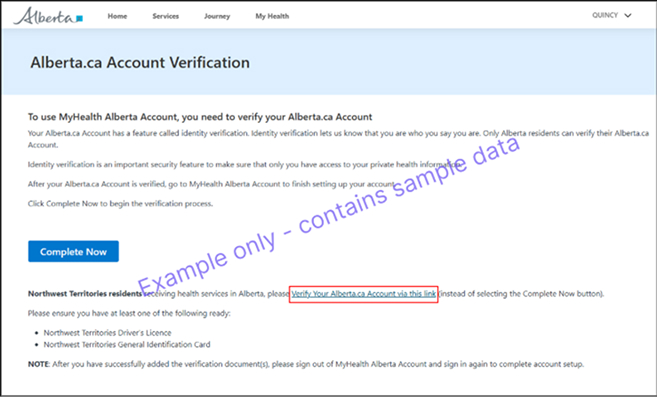
Alberta.ca Account Verification

  • Once logged in, Northwest Territories residents will be directed to verify their Alberta.ca Account using the Document Verification Service (DVS).
  • Select “Verify Your Alberta.ca Account via this link”
  • Select “Verify account”
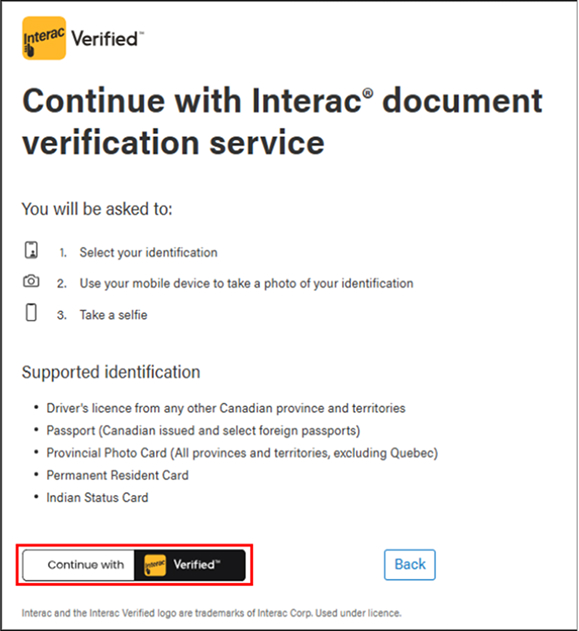
  • Verify your documents through the Interac document verification service. You will be prompted to complete this verification on your mobile device.

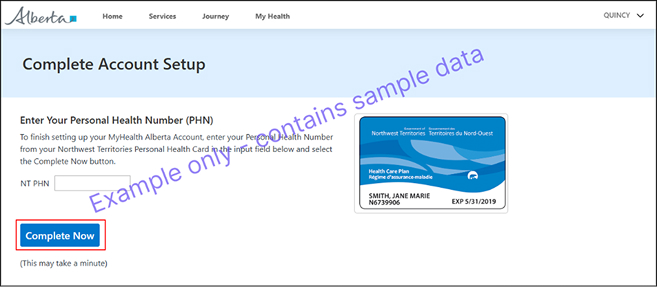
Complete Account Setup

  • Enter your Northwest Territories Health Care Card personal health number to complete your account setup.
  • After you complete the account setup, you will be able to access your health records from the Home page of your MyHealth Alberta Account.

Go to Top